
In Demystifying AI Agents: Learning the Mechanics with Rust, we saw that an AI agent is just a while loop wrapping a stateless LLM. It asks the model to act, runs a tool, updates history, and repeats. No magic, just plumbing.
Introduction
My PM colleague mentioned that most of his day-to-day work had moved from the browser into an IDE, with AI supporting a lot of it. I noticed the same thing when writing for this blog. I'd built a custom admin interface for a better writing experience, but once I started using AI agents to help with posts, I found myself moving back to an IDE.
That got me thinking. IDEs have deep integration with the device. They can read files, run shell commands, and know what you're looking at. Web agents don't have any of that today. But for something like writing a blog post, I don't see a fundamental reason why the web can't. The gap isn't capability; it's where the agent loop runs.
Most agent frameworks assume agents belong on the server, treating the browser as a "dumb terminal" for sending prompts and displaying text. The result is often a chat panel bolted onto a product, not built into it. It can answer questions, but it can't interact with the application or react to what's on screen.
If the agent's loop runs on a remote server, it lacks awareness of the user's browser environment. Reading the text the user selected, checking local storage, or reading UI state requires cumbersome piping through websockets or polling, fighting the environment rather than using what's already there.
What if the browser is the agent? Consider a browser-based text editor agent. It reads highlighted text, renders surgical edits as diffs, and pauses for user approval.
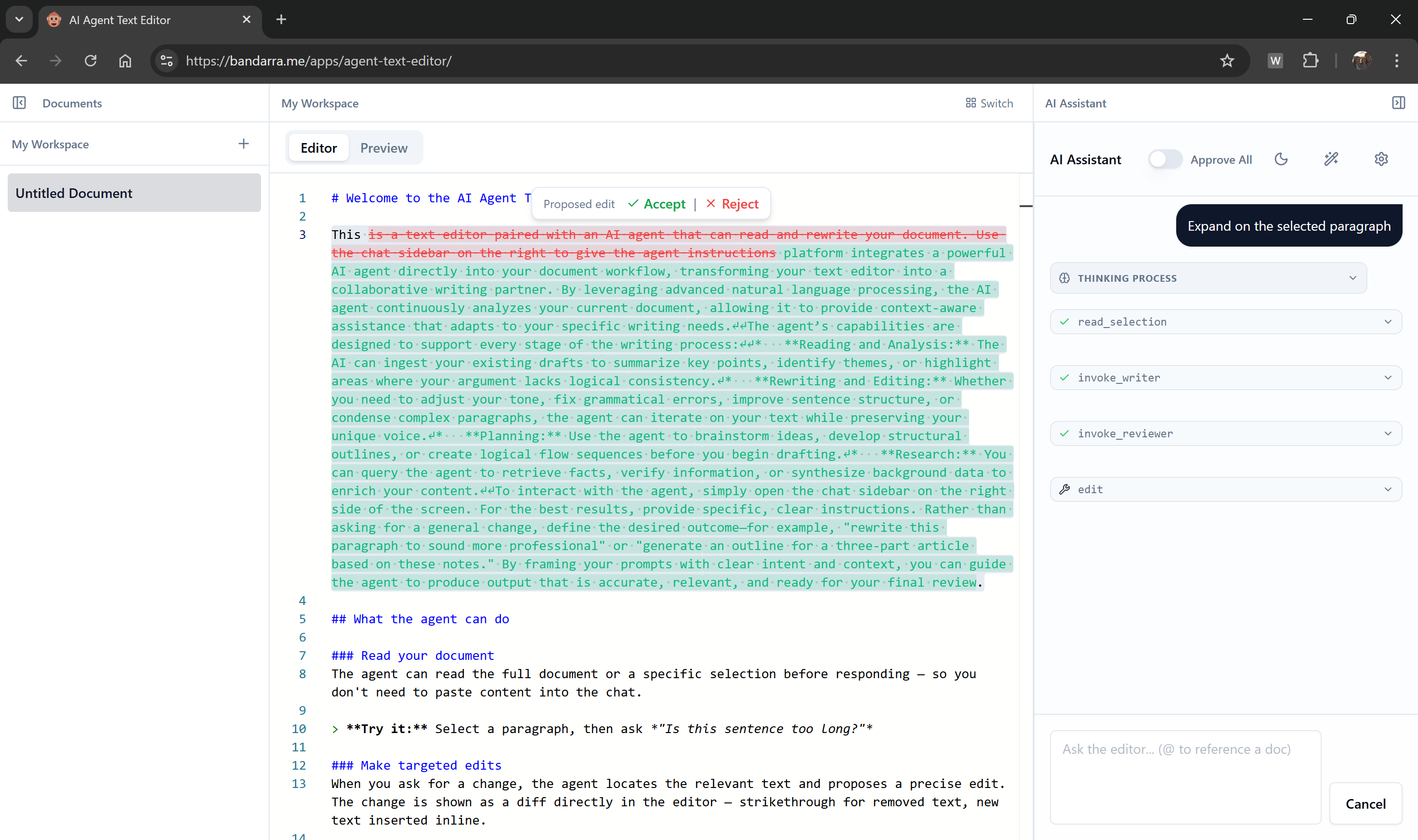
That kind of integration is far more natural when the loop runs directly in the client. The tool executes in the browser and the loop pauses until the user responds.
The case for client-side agents
Server-bound agents have one core limitation: they can't see the client-side state and synchronizing changes to the UI from tool calls is cumbersome.
A server-side agent has to wait for the client to send it whatever it needs from the page. To interact with the app, it has to predict an action, send it to the client, and wait for a callback to run the JavaScript.
A client-side agent lives inside the application. It reads the client-side state directly and can check the value of a React state hook, inspect local storage, update the interface or prompt the user without network overhead.
CLI agent tools like Claude Code and Gemini CLI already use this pattern. The loop runs in a local process, tools touch the file system and shell, and the LLM is still a stateless remote endpoint. The browser is the same idea in a different runtime, with different local resources: the DOM, browser storage, and the user's active sessions.
The browser as orchestrator
The architecture is simpler than it sounds. Move the loop to the browser, and the browser becomes the orchestrator.
Hybrid orchestration map
Shifting the source of truth
In a traditional server-centric agent, the backend runs everything. It holds the conversation history, calls the LLM in the loop, and executes the tool calls. The frontend is just a display layer, and deferring tool calls or sub-agents to the client-side is architecturally complex.
When running the loop on the client-side, web application owns the conversation state and invokes the LLM, which can live in the Cloud, in each loop. The tool calls can be handled on the client-side or, when required, can be easily deferred to the server-side via calls to REST APIs. Similarly, sub-agents can live on the client-side or on the server side.
Protecting your system prompts
A concern I hear oftenn from developers is how to protect their prompts on the client-side. Because a client-side agent loop can use a Cloud LLM the "secret sauce", the system prompts for the application can be stored and injected into the prompt on the server.
Choosing your architecture
To recap, the fundamental difference is where the agent loop—the orchestrator—lives. It doesn't mean that all agents need to run on the client-side. If an agent primary interacts with backend systems and requires no integration to the user-interface other than displaying the results, a server-side loop might be a great choice, as it also enables the same agent to run across other surfaces.
But if you want your agent to have a tight intergration with the user interface, pulling client side data, showing confirmation dialogs for tool calls, reading and updating UI state, it's likely a client-side agent will give you more flexibility.
Building the loop in TypeScript
The architecture sounds sophisticated. The code is not.
The loop has four steps:
Here's that loop in TypeScript, stripped to its essentials:
async function runAgent(prompt: string) {
  // The browser owns the conversation state
  const history = [{ role: 'user', content: prompt }];

  while (true) {
    // 1. Ask the model what to do next
    const response = await model.generate(history, tools);

    // 2a. The model gives a final answer
    if (response.text) {
      history.push({ role: 'assistant', content: response.text });
      return response.text;
    }

    // 2b. The model wants to call tools
    if (response.toolCalls) {
      history.push({ role: 'assistant', toolCalls: response.toolCalls });

      for (const call of response.toolCalls) {
        // 3. The browser executes the tool locally
        const result = await executeTool(call.name, call.args); // error handling omitted for clarity

        // 4. Record what happened
        history.push({
          role: 'tool',
          toolCallId: call.id,
          content: result
        });
      }
      // 5. The loop repeats, sending the updated history back to the model
    }
  }
}
Handling the cycle
The loop handles the classic agentic cycle:
- Send the full history to the model.
- If the model returns tool calls, execute them.
- Append the tool calls and their results to the history.
This is what most frameworks hide behind layers of abstraction. Once you understand this loop, you can build your own agent framework in a few hundred lines of code. If you want to see a concrete implementation of this loop, check out AgentRunner in the mast-ai repository.
The history array grows with every turn. For long-running agents, you will eventually hit the model's context window limit. Plan for this early: common strategies include summarising older turns into a single message, or dropping tool results once their content has been acknowledged by the model.
Delegating to specialized agents
One more thing worth knowing: agents can delegate tasks to other, specialized agents.
Agent delegation tree
The agent loop takes conversation history and calls tools. A tool is just a function that returns a string, and that function can be another agent loop.
Imagine a general "Assistant Agent" that handles user requests. If the user asks for a deep research report on a topic, the main agent doesn't need to do the research itself. It can call a specialized "Research Sub-Agent" exposed as a tool.
The main agent pauses its loop, calls the research tool with a query, and the sub-agent starts its own loop to fetch URLs, summarize pages, and synthesize a report. When the sub-agent finishes, it returns the report as a string to the main agent, which resumes its loop.
The sub-agent could be running on the same main thread, in a background Web Worker to keep the UI responsive, or on a remote server entirely. It might use the same LLM or a different model optimized for the task. To the parent, it's just another tool call.
Sub-agents that do heavy work (fetching URLs, scraping pages, running long loops) are natural candidates for Web Workers. Wrapping a sub-agent in a Worker keeps it off the main thread so the UI stays responsive while it runs.
Conclusion
The server doesn't go away when you move the loop to the browser. It still runs the LLM, protects your credentials, handles heavy compute. But the browser decides when to call it, what to send, and what to do with the response.
If you're building an AI agent for the web, consider running the loop in the browser. Think about the text editor from the introduction: an agent that reads your selection, queries your workspace, delegates to a reviewer or writer sub-agent when needed, and renders the result as a diff for your approval. That's not a chatbot bolted onto a sidebar. That's a first-class feature, and it only works naturally when the loop lives where the UI lives.
If you want to try the text editor yourself, head over to bandarra.me/apps/agent-text-editor (you'll need a Gemini API key, which you can get free at Google AI Studio). The source is at github.com/andreban/agent-text-editor.
If you want to see how the agent loop is implemented, or want a foundation to build your own browser agents, check out mast-ai on GitHub.
Comments
No comments yet. Be the first to comment!
Leave a comment
Comments are moderated and may take some time to appear.