
Every WebMCP demo I've built so far has the same shape: a page registers some tools, and an AI agent in the browser picks which ones to call. That's what the API was designed for, and it's where most of the conversation is.
But a WebMCP tool is a named function with a description, a JSON Schema for its input and, more recently, a JSON Schema for its output. The page keeps it up to date as the UI changes. Nothing in that list needs a language model.
So I wanted to try something: what can you build on top of WebMCP tools if you take the agent out completely?
The Foundation: Tools Are a Structured Surface
From the page's side, WebMCP is document.modelContext.registerTool(). You give it a name, a description, optional inputSchema and outputSchema, some annotations such as readOnlyHint, and an execute function. Tools can also be declared in HTML with <form toolname>.
The other side is the interesting part for this experiment. Chrome also exposes getTools() and executeTool() on document.modelContext, plus a toolchange event that fires when the page registers or removes tools. A Chrome extension's content script can reach all three from its isolated world, without injecting anything into the page.
That means any page with WebMCP tools has a typed, self-describing API that runs in the user's own session, with the user's own login and state. An agent is one possible caller. It doesn't have to be the only one.
The Experiment: WebMCP Macros
WebMCP Macros is a Chrome extension that runs deterministic automations ("macros") against the tools a page registers. There is no LLM anywhere in the product. A macro is a small program of tool calls, branches and loops that you put together from blocks, a bit like Scratch:
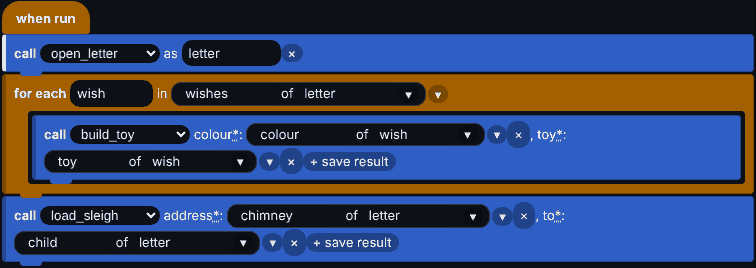 Figure 1: The block editor. The blue blocks at the top of the palette come from the tools the current page registers right now.
The editor starts from the page you want to automate. It calls getTools(), and each tool becomes a call block in the palette. The schemas fill in the rest of the UI: an argument with an enum turns into a dropdown, a required argument shows up as a slot, and a tool that isn't registered right now is greyed out with (not on this page).
Under the blocks, a macro is plain JSON. Here's a trimmed version:
{
  "wmm": 1,
  "name": "Answer a letter",
  "sites": { "workshop": { "match": ["https://bandarra.me/apps/webmcp-santa-workshop/*"] } },
  "tools": { "open_letter": { "site": "workshop", "name": "open_letter" } },
  "trigger": { "site": "workshop", "anyOf": [["open_letter"]] },
  "program": [
    { "op": "call", "tool": "open_letter", "saveAs": "letter" }
  ]
}
The JSON is the only representation. The editor edits it, the interpreter runs it, and the share feature compresses it into a single wmm1.… string you can paste into a chat, similar to how Factorio shares blueprints. The interpreter can't run code, reach the network or touch the DOM: its only effect on the world is calling the page's tools.
Once saved, a macro waits for its site. When the URL matches and the trigger tools are registered, a small launcher shows up in the corner of the page. You click it, fill in any inputs the macro asks for, and watch it run step by step, with a Stop button. Inputs marked "remember" are pre-filled with your last value and stay in local storage. They never go into the shared string.
Chaining Tools Without a Model
A macro that calls one tool isn't very interesting. The fun starts when one tool's output feeds the next tool's input, which is exactly what an agent would do in a multi-step task.
To test that, I built a small festive demo, Santa's Workshop. A random child's letter sits on Santa's desk, and four tools let you answer it:
open_letter()reads the letter and returns{ child, chimney, wishes: [{ toy, colour }] }.build_toy({ toy, colour })builds one toy and puts it in the sack.load_sleigh({ to, address })delivers the sack, but only iftois the letter's child,addressis its chimney, and the sack holds exactly the wished toys.empty_sack()clears the sack after a mistake.
 Figure 2: Santa's Workshop. Every letter is different, so nothing can be typed into the macro ahead of time.
Each letter is random, so the only way to win is to pass data between tools. Only open_letter declares an outputSchema, because its fields are what the other tools take as input:
{
  name: "open_letter",
  description: "Reads the child's letter waiting on Santa's desk. Use first, to learn which toys to build and where the sleigh must deliver them.",
  annotations: { readOnlyHint: true },
  outputSchema: {
    type: "object",
    properties: {
      child: { type: "string", description: "The name the letter is signed with. Pass it to load_sleigh." },
      chimney: { type: "string", description: "Where the child lives, exactly as load_sleigh needs it." },
      wishes: { type: "array", items: WISH_SCHEMA, description: "The toys asked for. Build each one with build_toy." }
    }
  },
  execute: () => app.openLetter()
}
In the editor, that outputSchema is what makes chaining easy. After call open_letter as letter, the for each block offers the fields of letter in a picker, so you can loop over wishes of letter without knowing the shape of the result in advance. Figure 1 shows the finished program.
The full macro is four blocks: call open_letter as letter; for each wish in wishes of letter, call build_toy with toy of wish and colour of wish; then call load_sleigh with child of letter and chimney of letter. It answers every letter, every time, without anything being typed in.
When I wrote about outputSchema earlier, the point was to help an agent pick the right tool before calling it. The same schema helps a human building a program by hand: it tells the editor what a result looks like before the macro has ever run.
Macros Across Sites
Tools on different sites don't know about each other, but a macro can carry values between them. The extension ships with a few sample macros, and one of them plans a trip across four demos:
- It searches the flight search demo and keeps the three cheapest flights.
- It opens the spreadsheet demo, adds a new sheet and writes the trip dates.
- It searches the hotel demo and keeps the three cheapest hotels.
- It writes everything into the sheet, then saves a summary in a text editor on a different origin.
Values only cross sites through macro variables, and each onSite block switches the run to a tab for that site. Macros have no date arithmetic, so the macro writes =DAYS(C2,B2) into the sheet and reads the number of nights back from the set_values result, then passes it to the hotel search. The spreadsheet's tools did the maths.
The other samples are games. The WebMCP Maze macro explores a fogged maze, picks up items to clear doors and rocks, and walks out of the exit. Another one plays through WebMCP Adventure from the Janitor's Closet to an active hyperdrive. Those games were built as agent playgrounds, and they work just as well as targets for a small, deterministic program.
The Trade-Offs
Building this showed me a few things that are worth knowing if you want to try something similar.
- Good agent tools are good macro tools. The WebMCP best practices helped here too. Clear names and "What + When" descriptions make the palette readable, an
outputSchemaon consolidated read tools makes chaining easy, and returning{ error, code, retryable }instead of throwing lets a macro branch on a failure. A tool that is vague for an agent is also hard to use from the editor. - Tools are dynamic. A tool that was there a second ago may be gone after a navigation, and a results page often registers its tools only after it mounts. Macros have a
wait untilblock that waits for a tool to appear, the launcher re-checks on everytoolchange, and the runner never assumes a tool it saw earlier still exists. - The API is still moving. WebMCP is in an origin trial, so details of the API surface and behavior are still evolving across browser releases.
- Macros treat tools as stable APIs. A macro calls each tool with the name and arguments it was built with, and assumes they stay the same. An agent reads the tools again on every task, so it can generally adapt when a site renames a tool or changes an argument. The extension stores a snapshot of each tool's schema and marks a macro "Needs update" when the page's schema no longer fits, and then it's up to you to update the macro.
- No security hardening. Macros can't run code, but a shared macro can still call any tool on the sites it lists, including ones that change data. The import screen shows those sites and tools before you save, and that's about it. WebMCP Macros is a demo, not a product.
Where Else Could WebMCP Go?
Macros are one idea. Once you see WebMCP tools as a structured, live description of what a page can do, a few others come to mind:
- Testing. End-to-end tests that call the same tools an agent would, instead of clicking through selectors that change with every redesign. The WebMCP Macros repository already runs a macro in real Chromium as its end-to-end check.
- Command palettes and keyboard shortcuts. A browser extension that lists the current page's tools in a quick-launch box, with a form generated from each
inputSchema. - Accessibility and alternative input. Voice commands or switch access mapped to tools, with the schema telling you exactly which values are valid.
- Integrations between sites. Small "when this, then that" flows between web apps the user is already signed in to, without a server in the middle.
- Learning to program. Real websites as the stage for a Scratch-like editor is a fun way to learn loops and variables, and the Santa demo is basically that.
None of these need a model, and all of them benefit when sites invest in good tools. A well-designed WebMCP tool is useful to agents, and also to whatever developers come up with next.
Try It Out
The extension isn't on the Chrome Web Store. You can build it from andreban/webmcp-macros and load the dist/ folder as an unpacked extension. You need a Chrome version with WebMCP, either on a site in the origin trial or with chrome://flags/#enable-webmcp-testing enabled.
Then open Santa's Workshop, click the extension's toolbar icon to open the side panel, start a new macro from that page, and build the four-block macro from the chaining section. If you'd rather start from code, the workshop's tools are in andreban/webmcp-santa-workshop, and they follow the build-webmcp-tools skill.
Comments
No comments yet. Be the first to comment!
Leave a comment
Comments are moderated and may take some time to appear.